 wardian
Meeting notes
Paste meeting notes or a transcript and get a summary, the decisions, a checklist of action items and the open questions. Uses Claude when it is set up, and a local reader when it is not.
It is free. You get a .wardian file to open in Wardian.
Try it
Runs here as it does in Wardian, without its saved data, channels or other apps.
About
For anyone who leaves a meeting with a page of notes or a transcript: get a short summary, the decisions, a checklist of who does what by when, and the questions left open, ready to paste into a wiki, a ticket or an email. Claude reads the notes when it is set up; a quick reader works when not.
What you put in
| Field | Type | Unit | Allowed | Default | Required |
|---|---|---|---|---|---|
| Meeting | short text | — | up to 120 characters | the sample's name on a first visit | no |
| Notes or transcript | long text | — | plain text or Markdown, up to 200,000 characters | the sample meeting on a first visit | yes, to read |
| Open a file | file | — | .txt or .md, up to 2 MB, text only | — | — |
| An action item's task | short text | — | up to 500 characters | what the reader found | yes |
| Its owner | short text | — | up to 80 characters | what the reader found | no |
| Its due date | short text | — | up to 80 characters, as said ("Friday", "Oct 22") | what the reader found | no |
| Done | on or off | — | — | off | — |
What it shows
- Reader: whether Claude or the quick reader is reading, a progress bar with Stop while Claude reads, and how to turn AI on when it is off.
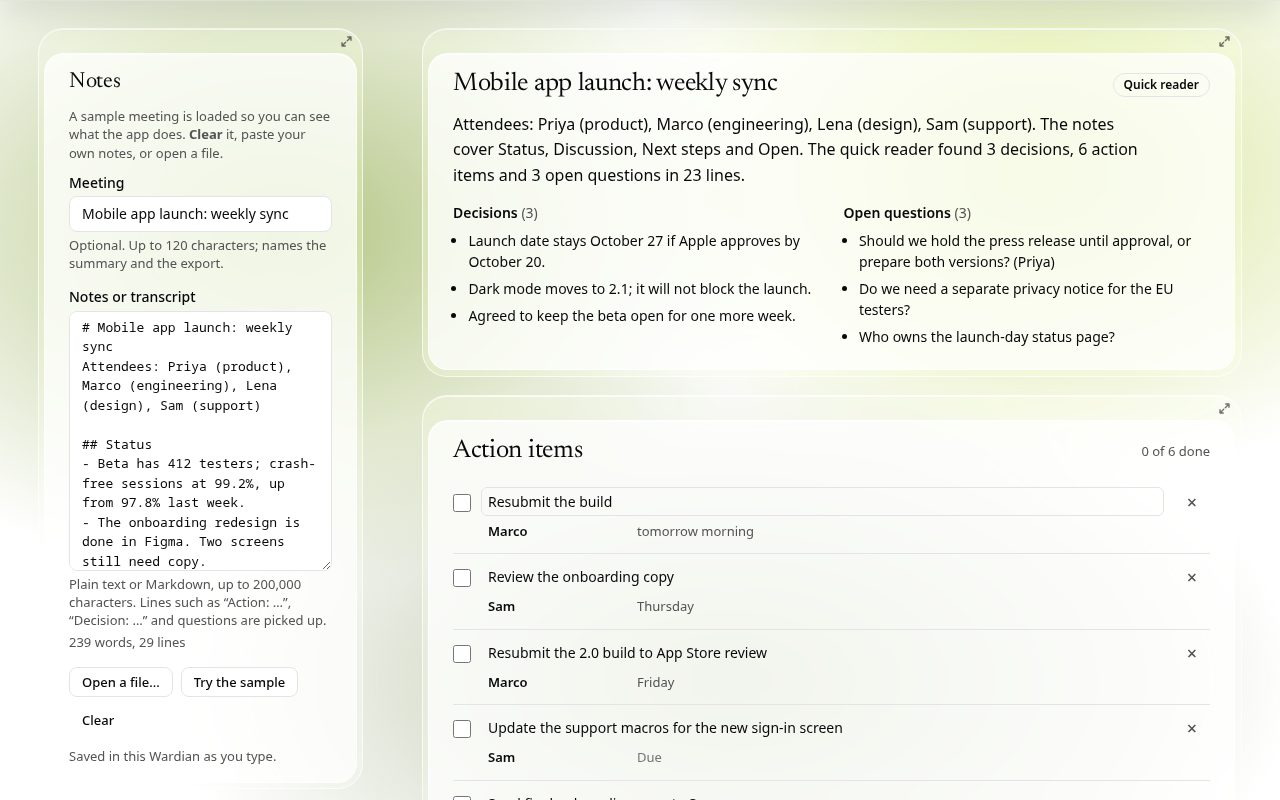
- Summary: a few sentences, the decisions and the open questions, and who read them.
- Action items: a checklist you own: tick, edit, remove, add.
- Export: everything as Markdown, to download or copy.
How it behaves
- A first visit opens on a sample meeting, labelled as a sample, so every panel shows what it does. Clear empties it; typing, pasting, dropping or opening a file replaces it. The notes are kept in this Wardian as you type.
- The quick reader reads the notes as they change. Read with Claude sends them to Claude when it is set up; the other buttons are disabled while it reads, the progress bar says so and offers Stop, and a failure says why and falls back to the quick reader's results.
- A file that is too large or not text is refused with a message saying what is allowed; nothing already typed is lost.
- Download and Copy are disabled only with the reason beside them (nothing to export yet, or downloads not available); Download says "Saving…" while it saves.
Layout
Two columns: the notes and the reader on the left, the results on the right; one column on a phone. Tab order is the reading order.
| Panel | Holds |
|---|---|
| Notes (aside) | Meeting (text, size-lg, hint); Notes or transcript (textarea, 8 rows, size-full, hint and a word count); Open a file…, Try the sample, Clear. |
| Reader (aside) | Its mode, Read with Claude or Use the quick reader, the progress bar, and How to turn on AI. |
| Summary | The summary, Decisions and Open questions; empty: how to start. |
| Action items | The checklist (a box, the task, owner and due, Remove), then Add an item. |
| Export | Download Markdown and Copy, with their reason when disabled; the Markdown itself. |
How it is built
A Wardian suite of five sealed apps, plain JavaScript. It shows claude:sample (AI inside an app) and what an app does when AI is not there.
| App | Slot | Job | Contract |
|---|---|---|---|
notes | aside | The meeting's name and its notes or transcript: typed, pasted, dropped, or opened from a .txt or .md file. A sample meeting to try. Remembers them. | emits notes:changed (retained); storage |
ai | aside | The only part that reads the notes. Owns every call to Claude, the progress bar with Stop, the error messages, and the quick reader that needs no AI. | listens notes:changed; emits notes:extracted (retained); storage, claude:sample |
summary | main | The summary, the decisions and the open questions, and who read them. | listens notes:extracted |
actions | main | The action items as a checklist you own: tick, edit owner, task and due date, remove, add. | listens notes:extracted; emits actions:changed (retained); storage |
export | main | Everything as Markdown: download it, copy it, or read it in place. | listens notes:extracted, actions:changed; claude:downloads |
How a change flows: you type in notes → it emits notes:changed → ai reads the notes, with Claude when you press Read with Claude, or with the quick reader → it emits notes:extracted → summary, actions and export draw. When you tick an item, actions emits actions:changed, and export writes the tick into the Markdown.
With and without Claude
ctx.cap('sample') resolves to null when this Wardian has no Claude provider. Then:
- The Reader panel says AI is off, and how to turn it on: Settings → Claude, add an Anthropic API key or Amazon Bedrock, reload.
- The quick reader (
apps/ai/local.js) reads the notes on your device each time they change. It findsAction:,TODO,Next step:, check boxes- [ ],@name will …,Name to …, a speaker's "I'll …" in a transcript,Decision:/Agreed:/ "We decided to …", andQ:or any line that ends with?. It takes the owner from@nameor the speaker, and the due date from "by Friday", "due Oct 22", "tomorrow" and the like. It gives the same answer for the same text. It does not write a summary: it lists the attendees, the headings and what it found.
With Claude set up, the quick reader still shows its result at once. Your notes go to Claude only when you press Read with Claude; the first time, Wardian asks you to allow it. ai calls sample.json(prompt, { signal }) and checks that the answer has the expected shape (shared/text.js, Text.reading). Wardian runs the request as a background job and hands back the whole answer at once, so the bar shows a running clock rather than a share done. Stop aborts the AbortSignal.
Every error code in SPEC.md 6.6 has its own message (apps/ai/claude.js):
| Code | What the app says and does |
|---|---|
not_granted | You did not allow Claude; press again to be asked, or change it in Settings → Permissions. |
rate_limited | Wait a minute, then try again. |
refused | Claude declined to read these notes. |
invalid_json | The answer was not in the expected form; try again. |
prompt_too_large | The notes are too long: shorten them or split the meeting. The app checks this before it sends anything. |
cancelled | Stopped. Nothing changes. |
error | Could not reach Claude, with the reason. |
After any failure but Stop, the quick reader's result shows, with a note that says why. A reading by Claude of the same notes is never replaced by a quick one. When you change the notes after Claude read them, its reading stays, marked as out of date, until you ask again.
Saved state
notes keeps the notes, ai the latest reading, and actions your checklist, each in ctx.store. A reload shows the same reading with the same ticks. When a new reading arrives, actions keeps your ticks on items with the same task, keeps your edits, and keeps the items you added.
Limits
- Claude sees up to 58,000 characters of notes, about 9,000 words: Wardian takes prompts up to 60,000 characters. The answer is kept short (at most 12 decisions, 20 action items and 10 questions), because Wardian allows a JSON answer about 2,000 tokens.
- A file you open may be up to 2 MB, and must be text.
- Copy uses the clipboard when the browser allows it in a sandboxed frame. When it does not, the app selects the Markdown and asks you to press Ctrl+C.
- The quick reader knows English patterns only.
What's new
Version 2 Oct 12, 2026
Rebuilt to the new standard: clearer fields with units and limits, help and errors right under each field, sample data labelled, and the app opens straight on its content.
Version 1 Oct 11, 2026
First published.
Ratings and reviews
No ratings yet.