 wardian
Game of Life
Conway's Game of Life with the simulation in WebAssembly: draw cells, load classic patterns, switch rules.
It is free. You get a .wardian file to open in Wardian.
Try it
Runs here as it does in Wardian, without its saved data, channels or other apps.
About
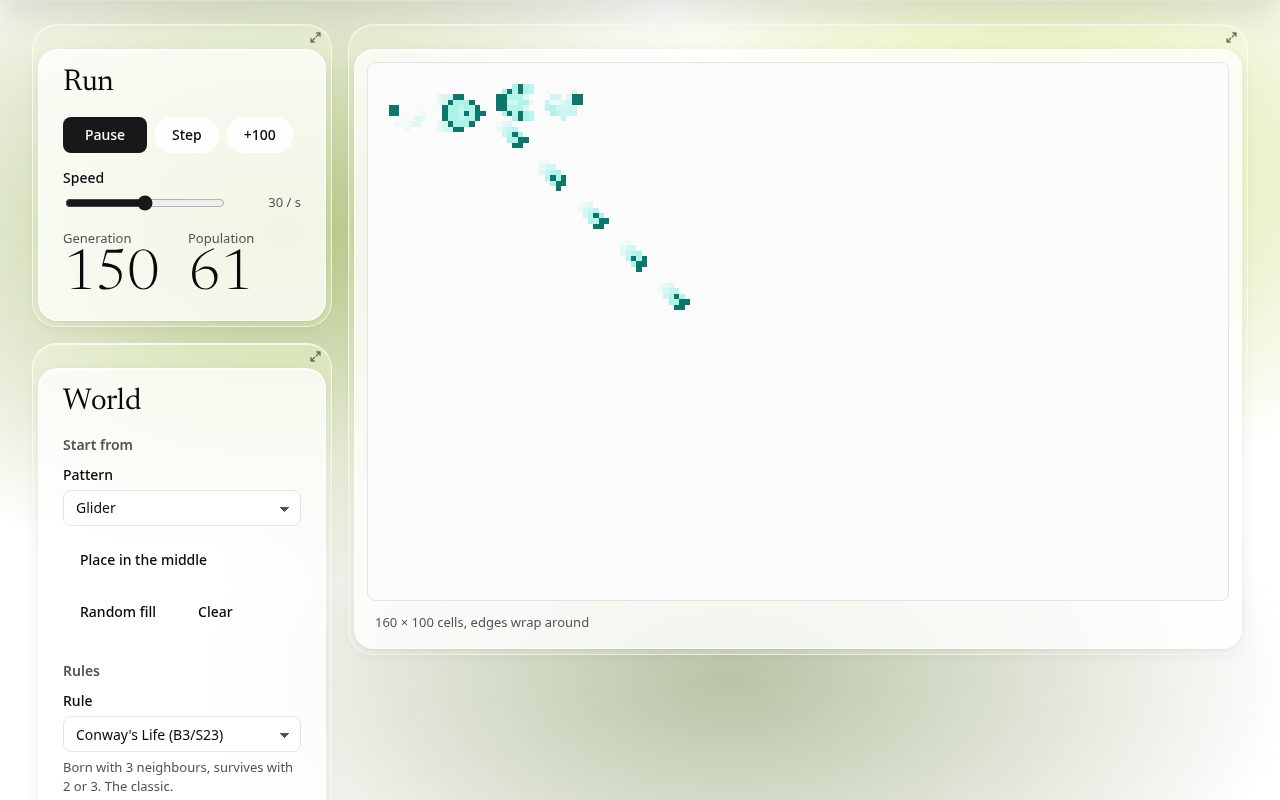
For anyone curious about how simple rules make complex patterns: watch Conway's Game of Life run, draw your own cells, drop in the classic patterns, and try other rules. The whole simulation runs in WebAssembly, so even the biggest grid plays smoothly.
What you put in
- Speed: a slider, generations a second, 11 steps from 1 to 1,000, default 30. Always valid.
- Pattern: one of 7 (glider, lightweight spaceship, Gosper glider gun, pulsar, R-pentomino, acorn, replicator), default glider; placed in the middle with Place in the middle.
- Rule: one of 3 (Conway's Life B3/S23, HighLife B36/S23, Seeds B2/S), default Conway's Life.
- Grid: one of 4 sizes (80 × 50, 160 × 100, 320 × 200, 640 × 400 cells), default 160 × 100. Changing it clears the board.
- Fading trails: on or off, default on.
- Cells: click or drag on the board to draw; starting on a live cell erases.
There is no typed input, so every value is valid by construction: each control offers only allowed values.
What it shows
- The board: live cells, with recently dead cells fading when trails are on.
- Generation: how many generations have run since the board was last filled or cleared.
- Population: how many cells are alive now.
- The rule in words under the Rule menu, and the grid size under the board.
How it behaves
- It opens on a Gosper glider gun, playing. If the system asks for less motion it opens paused and says why.
- Play and Pause share one button (pressed while playing). Step runs one generation and pauses; +100 jumps a hundred generations at once.
- Random fill, Clear and a new grid start the generation count again.
- The edges wrap around. Nothing is kept between visits: closing the page ends the drawing.
- Keys, when no control has focus: Space play or pause, S step, R random fill, C clear.
Layout
- Side column, in reading and tab order:
- Run: Play (the main action), Step, +100, Speed, and the generation and population figures.
- World, in two groups:
- Start from: Pattern (select,
size-lg), Place in the middle, Random fill, Clear. - Rules: Rule (select,
size-lg, the rule in words as its hint), Grid (select,size-md, hint: changing it clears the board), Fading trails (switch). - How to play: the rules of the game and the keys.
- Main column: the board, with the grid size and any motion note under it.
- Every part is an Arrange panel. At 760px and below the columns stack, the board last.
- States: playing and paused (the Play button's label and pressed state); paused for reduced motion, with the reason under the board.
How it is built
| File | What it is |
|---|---|
index.html | The page: the run, world and help panels, and the board. |
app.js | Plays the generations, draws the board, reads clicks, and holds the patterns. |
src/lib.rs | The world: init, set_rule, set_cell, get_cell, clear, randomize, step, population, render. |
app.wasm | Built from src/lib.rs by ./build.sh. |
ui/ | The Wardian component library: theme, button, field, card, switch, type, surface and Arrange. |
- The world lives inside the module's memory: two grids of one byte per cell, plus a "heat" grid that remembers how recently each cell died.
step(n)writes the next generation into the other grid and swaps them,ntimes in one call, and returns the population. At high speed the page asks for many generations per frame, so JavaScript never touches a cell in the loop.render(ptr, live, dead, glow, trail)writes one RGBA pixel per cell into a buffer the page reserved once withalloc; the page puts them on a small canvas and scales it up without smoothing.- A click or drag calls
set_cellfor each cell on the line, so a fast drag leaves no gaps. - Patterns are written in RLE, the text format Life programs share; adding one to
PATTERNSinapp.jstakes one line. The largest grid is 640 × 400 (initallows 2000 × 2000, but the cells become too small to draw).
What's new
Version 2 Oct 12, 2026
Rebuilt to the new standard: clearer fields with units and limits, help and errors right under each field, sample data labelled, and the app opens straight on its content.
Version 1 Oct 11, 2026
First published.
Ratings and reviews
No ratings yet.