 wardian
App store · Planning & finance
Loan planner
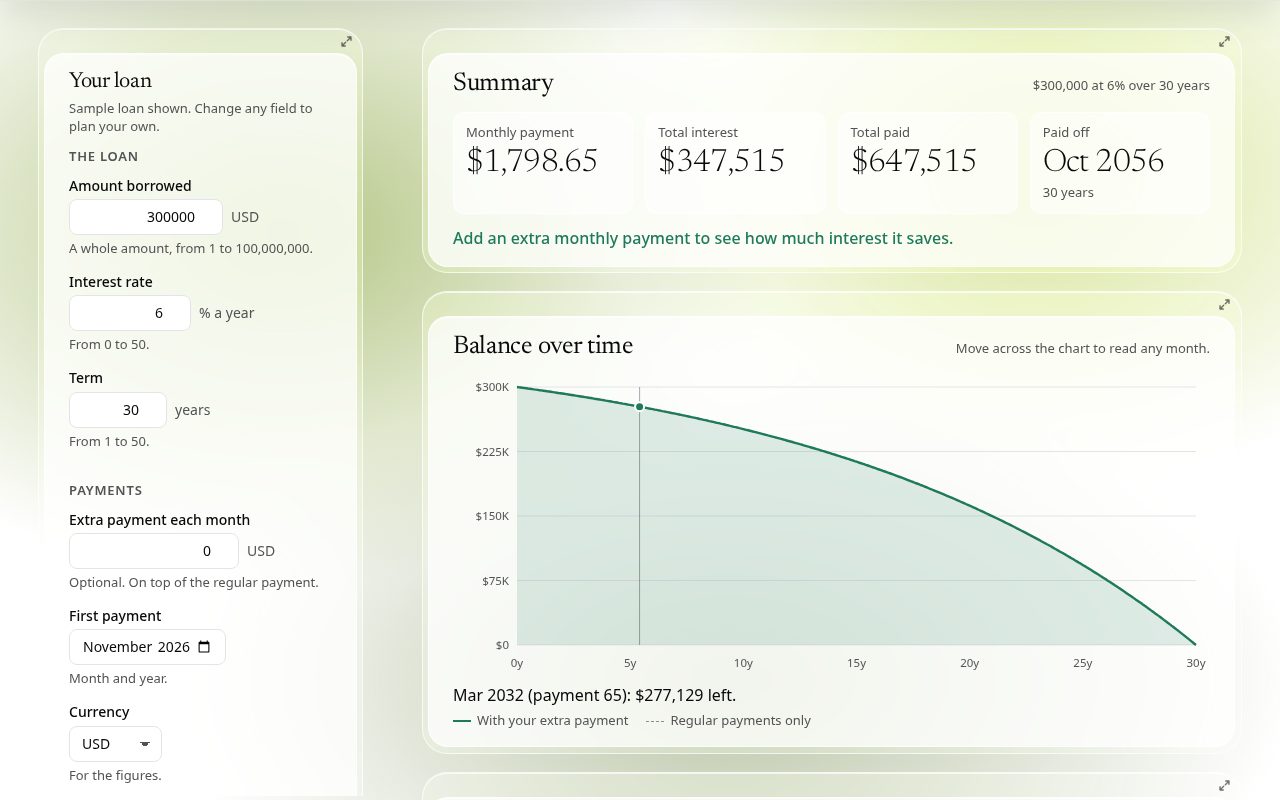
Plan a loan: monthly payment, total interest, a balance chart, and how much an extra payment saves.
It is free. You get a .wardian file to open in Wardian.
Try it
Runs here as it does in Wardian, without its saved data, channels or other apps.
About
For anyone weighing up a mortgage or a loan: see the monthly payment, the interest paid over the whole loan, when it is paid off, and how much a little extra each month saves.
What you put in
| Field | Type | Unit | Allowed | Default | Required |
|---|---|---|---|---|---|
| Amount borrowed | whole number | the currency | 1 to 100,000,000 | 300,000 | yes |
| Interest rate | decimal, 2 places | % a year | 0 to 50 | 6 | yes |
| Term | whole number | years | 1 to 50 | 30 | yes |
| Extra payment each month | decimal, 2 places | the currency | 0 to 10,000,000 | 0 (empty means 0) | no |
| First payment | month | month and year | 1950-01 to 2100-12 | next month | yes |
| Currency | one of 8 | code | USD, EUR, GBP, CAD, AUD, CHF, JPY, INR | USD | yes |
What it shows
- Monthly payment: the standard amortization payment for the amount, rate and term, plus the extra payment.
- Total interest and total paid: the sum of every month's interest, and that plus the amount.
- Paid off: the month of the last payment, and how long that is from the first.
- What the extra saves: the interest and time saved against the same loan with no extra payment.
- Balance over time: the balance after each payment, with and without the extra payment; move across the chart (or use the arrow keys) to read any month.
- Export: the whole schedule as a CSV file, a row per payment.
How it behaves
- It opens on a sample loan (300,000 at 6% over 30 years), labelled as a sample, so every panel shows what it does. Any change replaces it; the last valid loan is kept in this browser.
- Results update as you type. A field is checked when you leave it: a wrong value is outlined, and its hint says what is allowed. While any field is wrong, the summary and chart say to fix it rather than show numbers from a wrong value. Enter checks every field and goes to the first wrong one.
- Download is disabled only with its reason beside it (downloads unavailable, or a field to fix), and says "Saving…" while it saves.
- The numbers use the standard formula with no rounding to cents each month, so the totals can differ from a lender's statement by a few cents.
Layout
Two columns: the loan on the left, the results on the right; one column on a phone. Tab order is the reading order: the fields from top to bottom, then the chart, then Download.
| Panel | Holds |
|---|---|
| Your loan (aside) | The loan: Amount borrowed (size-sm, num, currency beside it); Interest rate (size-xs, num, "% a year") and Term (size-xs, num, "years") on one row. Payments: Extra payment (size-sm, num, currency beside it); First payment (month, size-sm) and Currency (select, size-xs) on one row. Each field has a hint that becomes its error. |
| Summary | Four tiles (monthly payment, total interest, total paid, paid off) and what the extra saves. Empty: "Fix the highlighted field to see results." |
| Balance over time | The chart, its reading of the month under the pointer, and a legend. |
| Export | Download schedule (CSV), with its state beside it. |
How it is built
A Wardian suite of six sealed apps; WebAssembly does the amortization.
| App | Slot | Job | Contract |
|---|---|---|---|
inputs | aside | The fields, checked with Loan's parsers; remembers the loan. | emits loan:changed (retained); storage |
engine | — | Runs engine.wasm: the monthly payment and a row per month. | provides schedule; asset |
planner | — | Turns each change into one plan for every viewer, with and without the extra payment. | listens loan:changed; needs engine.schedule; emits plan:ready (retained) |
summary | main | The headline numbers. | listens plan:ready |
chart | main | Balance over time. | listens plan:ready |
export | main | The schedule as CSV. | listens plan:ready; claude:downloads |
shared/loan.js holds one parser per field (the table above, as code), and shared/format.js the money, month and duration formats; both are in suite.json "scripts", so every frame has its own copy. The engine's source is src/lib.rs; rebuild engine.wasm with ./build.sh.
What's new
Version 2 Oct 12, 2026
Rebuilt to the new standard: clearer fields with units and limits, help and errors right under each field, sample data labelled, and the app opens straight on its content.
Version 1 Oct 11, 2026
First published.
Ratings and reviews
No ratings yet.