 wardian
App store · Planning & finance
Trip Cost Splitter
Split trip costs fairly: track who paid what, see balances, and get the simplest settlement plan.
It is free. You get a .wardian file to open in Wardian.
Try it
Runs here as it does in Wardian, without its saved data, channels or other apps.
About
For groups sharing expenses on a trip. Add the people, record who paid for what, and see who owes whom.
What you put in
- Currency: text, exactly 3 letters (case-insensitive, stored uppercase), default "USD", required. Locked after first expense is added.
- Person's name: text, 1 to 50 characters, unique in the list, required
- Expense description: text, 1 to 100 characters, required
- Amount: decimal, 0.01 to 1,000,000, required
- Who paid: selection from people list, required
- Split between: checkboxes for one or more people from the list, default all people currently on the trip (stored as person IDs), required
What it shows
- The currency in use (locked after expenses exist)
- The list of people on the trip with remove controls
- The list of expenses with details and delete option
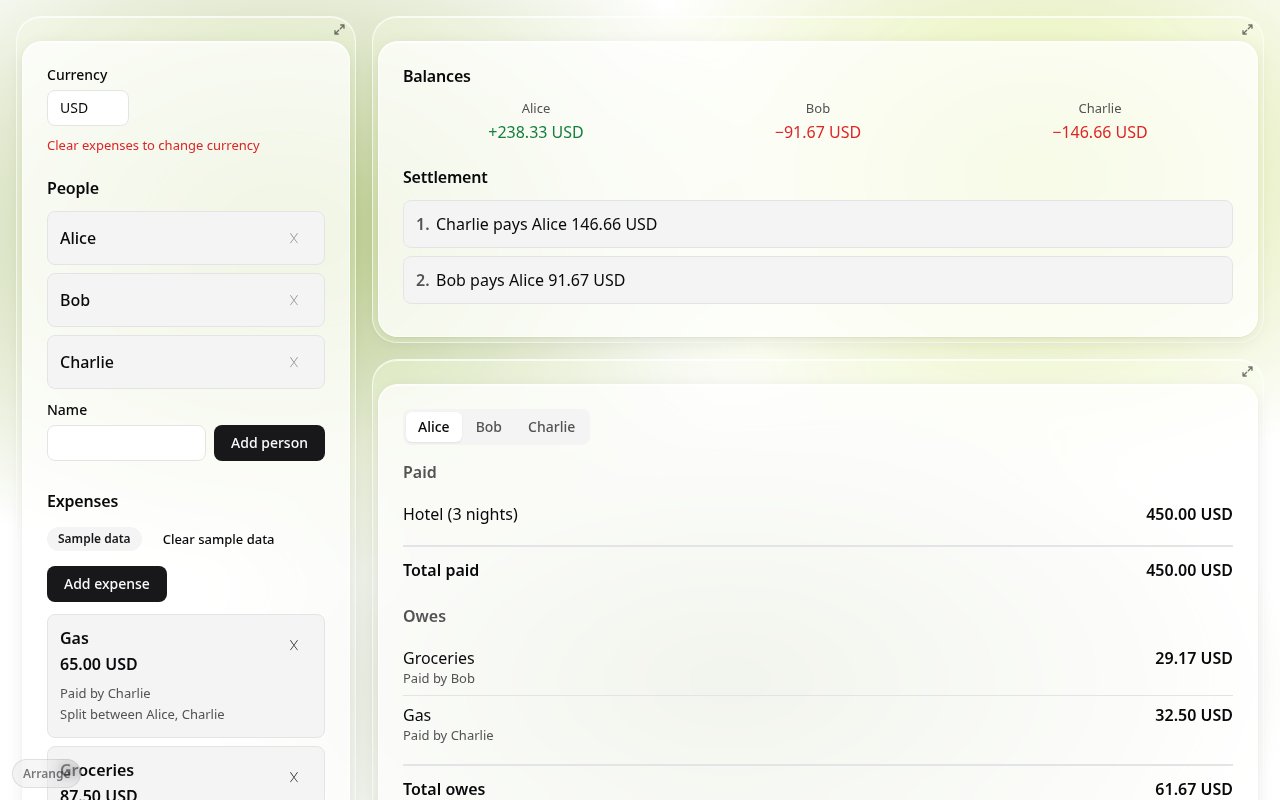
- Each person's balance: how much they're owed (positive) or owe (negative) overall
- The settlement plan: the minimum number of payments needed to balance everyone, showing who pays whom and how much
- A breakdown per person: what they paid for, and what they owe from other people's expenses
- Export button that generates Markdown text of the settlement for pasting in a group chat
How it behaves
- Opens with sample data: 3 people (Alice, Bob, Charlie) and 3 expenses showing different split scenarios
- Sample data is marked with a badge; "Clear sample data" removes all sample people and expenses at once
- Empty state prompts to add the first person when none exist
- Can't add expenses until at least 2 people exist (button disabled)
- Removing a person is blocked if they appear in any expense, with tooltip "Cannot remove [name]: appears in [N] expense(s)"
- Balances update immediately as expenses are added or removed
- Settlement algorithm: sorts people by absolute balance (largest first), then repeatedly settles the person who owes most with the person who is owed most, until all balances are zero
- Currency is locked once the first expense is added; tooltip explains "Clear expenses to change currency"
- Changing the person list does not affect existing expenses' splits (each expense stores its split as person IDs at creation time)
- Data is not kept between visits (page apps cannot store data persistently)
- Export creates formatted Markdown with the settlement plan and currency
Layout
Aside: "Setup"
- Currency field: text input, size-xs, label "Currency", validation on blur and submit (exactly 3 letters, case-insensitive), error "Enter a 3-letter currency code like USD", becomes disabled after first expense is added with tooltip "Clear expenses to change currency"
- Section heading "People" (h2)
- People list: each person's name with a remove button (icon-only, aria-label "Remove [name]"), remove button disabled when person appears in expenses with tooltip "Cannot remove [name]: appears in [N] expense(s)", people shown in order added
- Add person form: text field size-md label "Name", validation on blur and submit (1-50 chars, unique), error "Enter a unique name, 1 to 50 characters" or "This name is already in the list" when duplicate, button "Add person", both in a row, field clears on success
- Section heading "Expenses" (h2)
- Button "Add expense", disabled when fewer than 2 people exist with tooltip "Add at least 2 people first"
- Expenses list: newest first, each expense shows description, amount with currency code, "paid by [name]", "split between [names]" (all names if everyone, or list), and a delete button (icon-only, aria-label "Delete [description]")
- Empty state for expenses: "Add at least 2 people to record expenses" (when 0-1 people), or "No expenses yet. Add one to get started" (when 2+ people, no expenses)
- Sample data badge "Sample data" with button "Clear sample data" appears while sample data is present
Add expense dialog:
- Heading "Add expense"
- Description field: text input, size-full, label "Description", validation 1-100 chars, error "Enter 1 to 100 characters"
- Amount field: number input, size-sm, right-aligned, label "Amount", min 0.01, max 1000000, step 0.01, validation on blur and submit, error "Enter an amount from 0.01 to 1,000,000"
- Who paid: dropdown (select), size-md, label "Paid by", lists all people in order added
- Split between: checkboxes for each person, all checked by default, at least one required, label "Split between", validation error "Select at least one person"
- Buttons: "Cancel" (secondary), "Add expense" (primary), validation on submit shows first error
- Dialog closes on success or cancel, focus returns to "Add expense" button
- On success, form clears and is ready for another expense
Main: "Balances & Settlement"
- Section heading "Balances" (h2)
- Each person as a w-figure: name and their balance with +/- and currency code, people sorted by balance descending (most owed first), positive in green, negative in red, zero neutral
- Section heading "Settlement" (h2)
- Settlement plan: ordered list of payments, each "[Name] pays [Name] [amount] [currency]", or "All settled up!" if all balances are zero
- Rounding: when an expense is split, the amount is divided equally; any remainder cents are distributed one per person to the first N people in the split list (by order added), so totals always match
Main: "Details by Person"
- Tabs, one per person, labeled with their name, in order added
- Each tab shows two sections: "Paid" and "Owes"
- Paid section: list of expenses this person paid for, each showing description and amount with currency, plus total at bottom ("Total paid: [amount] [currency]"), or "Hasn't paid for anything yet" if empty
- Owes section: list of expenses this person owes a share of (that others paid for), each showing description, who paid it, and this person's share with currency, plus total at bottom ("Total owes: [amount] [currency]"), or "Doesn't owe anything" if empty
- Both sections update immediately as expenses change
Main: "Export"
- Section heading "Export Settlement" (h2)
- Paragraph: "Copy this settlement as Markdown to paste in a group chat."
- Button "Copy to clipboard" (primary), shows toast "Copied to clipboard!" on success
Markdown export format:
# Trip Settlement

**Currency:** [CODE]

## Balances
- [Name]: +[amount] [currency] (or -[amount])
- ...

## Settlement Plan
1. [Name] pays [Name] [amount] [currency]
2. ...

(or "All settled up!" if no payments needed)
Tab order: Currency field, person name field, add person button, add expense button, expense delete buttons (newest first), balances panel, person tabs, export button
Validation: All fields validate on change after first blur, and on submit. Invalid input does not clear the field. No results calculated from invalid input. Errors appear below fields with aria-invalid and aria-describedby.
Responsive: All panels stack at 360px. Fields use size classes. The aside is full width on narrow screens, main panels stack below.
Colors and spacing: From design tokens only. Cards are w-card w-glass. Spacing uses --w-space-3 to --w-space-5 between sections and elements.
Version history
Version 1 Oct 28, 2026
First published.
Ratings and reviews
No ratings yet.