 wardian
Focus log
Keeps every session the Focus timer sends, with your permission: time today, the last 7 days, time per label, and the full history.
It is free. You get a .wardian file to open in Wardian.
Try it
Runs here as it does in Wardian, without its saved data, channels or other apps.
About
For anyone using the Focus timer: every session you finish there lands here, so you can see how long you focused today, the last seven days, where the time went, and every session since you started. The two apps are separate packages that talk only on the channel focus.session, and only after you allow it (SPEC.md §6.9).
What you put in
| Field | Type | Unit | Allowed | Default | Required |
|---|---|---|---|---|---|
| Daily goal | whole number | minutes | 5 to 1,440 | 120 | yes |
| Period (Where the time went) | one of 3 | — | Last 7 days, Last 30 days, All time | Last 7 days | yes |
| Allow the channel | yes or no | — | Wardian's own question when the log first opens | — | — |
Sessions themselves come from the Focus timer: a label, minutes (above 0, up to 1,440), when it started and ended, and whether it was completed. A message that is not like that is refused and counted, never stored.
What it shows
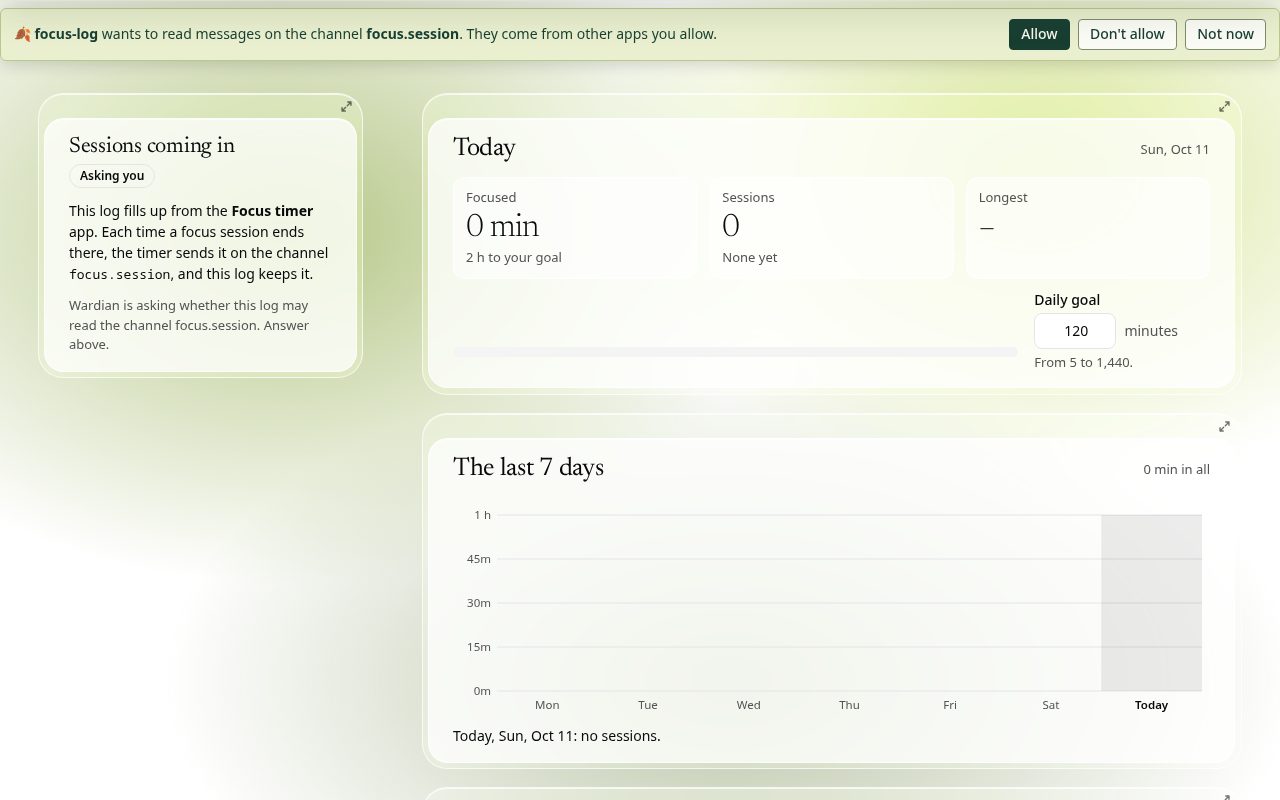
- Sessions coming in: whether the channel is open, and the last session received as a receipt.
- Today: minutes focused, sessions (completed and stopped early), the longest one, and progress toward the daily goal.
- The last 7 days: minutes per day as bars, today on the right; hover or use the arrow keys.
- Where the time went: minutes per label, most first, for the chosen period.
- Every session: newest first, 20 a page, each with Remove.
- Export: every session as CSV.
How it behaves
- Until the first session arrives, each panel says what fills it ("Finish one in the Focus timer").
- If you do not allow the channel, the log keeps what it has, explains how to change that, and offers Ask again.
- The goal is checked when you leave the field: a wrong value is outlined and its hint says what is allowed; the last valid goal keeps working until it is fixed, and nothing is replaced silently.
- Removing a session asks first, in a dialog (Escape keeps it).
- Download CSV is disabled only with its reason beside it (no sessions yet, or downloads not available), says "Exporting…" and shows progress while it writes.
Layout
Two columns: Sessions coming in on the left; Today, the last 7 days, Where the time went, Every session and Export on the right. One column on a phone. Tab order is the reading order.
| Panel | Holds |
|---|---|
| Sessions coming in (aside) | The channel's state, Ask again when refused, the last receipt. |
| Today | Three tiles, the goal meter, Daily goal (number, size-xs, num, "minutes" beside it, hint). |
| The last 7 days | The bar chart (focusable, arrow keys) and its reading. |
| Where the time went | Period (a radio group, arrow keys move), the list of labels. |
| Every session | The table (Remove on each row), Newer and Older. |
| Export | Download CSV with its reason when disabled, and the progress bar. |
How it is built
It is a suite because it has several jobs: receive, three summaries, a history and an export. Each part has its own panel and reads the same SQLite table.
| Part | Slot | Job | Contract |
|---|---|---|---|
inbox | aside | Receives on focus.session, checks each message, and adds it to the table. Shows whether the channel is open. When you do not allow it, it explains how to change that and offers Ask again. | emits log:changed (retained); db; receives focus.session |
today | main | Minutes today, sessions (completed and stopped early), the longest session, and a daily goal with a bar. | listens log:changed; db, storage (the goal) |
week | main | An SVG bar chart of the minutes on each of the last 7 days, today on the right. Hover over a day, or use the arrow keys, to read it. | listens log:changed; db |
labels | main | Time per label, most first, for the last 7 days, the last 30 days or all time. | listens log:changed; db, storage (the period) |
history | main | Every session, newest first, 20 per page, read with db.page. Each row can be removed. | listens and emits log:changed; db |
export | main | Downloads every session as CSV, read 1,000 rows at a time. | listens log:changed; db, claude:downloads |
How a session flows:
- The Focus timer sends
{label, minutes, started, ended, completed}onfocus.session. - Wardian stamps the message with the sender's name.
- inbox checks the message and runs
INSERT OR IGNOREintosessions. - inbox emits
log:changed. - Each view runs its own SQL again.
The views never wait on inbox's panel. They read the table when the app opens, so a hidden inbox changes nothing.
The table.
sessions(id TEXT PRIMARY KEY, day, label, minutes, started, ended, completed, source, received)id is the sending package and the start time. Wardian gives the latest message on a channel to an app that opens later, so the log sees the last session again each time it opens. The key makes sure that session counts only once. day is the local date the session started, in the time zone of the browser that received it.
shared/log.js holds the code the parts share, listed in suite.json "scripts":
- opening the database and making the table;
- checking a message;
- local days;
- how minutes and times read.
If you do not allow the channel, the log keeps the sessions it already has, but adds no new ones. The inbox says so and gives the steps. If you pressed Don't allow, open Settings → App permissions, press Revoke next to focus-log, then press Ask again. If you only closed the question, press Ask again.
Limits.
- A session must last more than 0 and at most 1,440 minutes. A label keeps its first 80 characters.
- Sessions sent while the log is closed are lost, except the latest one, which Wardian keeps for the channel.
- The log needs a Wardian with app databases (the
dbcapability). Without one, it says so.
What's new
Version 2 Oct 12, 2026
Rebuilt to the new standard: clearer fields with units and limits, help and errors right under each field, sample data labelled, and the app opens straight on its content.
Version 1 Oct 11, 2026
First published.
Ratings and reviews
No ratings yet.