 wardian
Habit tracker
Tick off your daily habits, see a year of them as a heatmap, and keep your streaks. Your data stays in this Wardian.
It is free. You get a .wardian file to open in Wardian.
Try it
Runs here as it does in Wardian, without its saved data, channels or other apps.
About
For anyone building daily habits: tick each one off every day, see a year of them at a glance, and keep your streaks going. Everything stays in this Wardian, with a backup file whenever you like.
What you put in
| Field | Type | Unit | Allowed | Default | Required |
|---|---|---|---|---|---|
| New habit | short text | — | 1 to 60 characters, not the same as another habit (any case); up to 100 habits | empty | yes |
| Colour | one of 8 | — | Green, Blue, Violet, Pink, Orange, Teal, Yellow, Grey | the first colour no habit uses | yes |
| Name (when renaming) | short text | — | as New habit | the current name | yes |
| A day's tick | on or off | a day | today and the 6 days before it (Today), any past day in the last 53 weeks (calendar); never a future day | off | — |
| Restore from a file | file | JSON | a backup from this app, up to 5 MB | — | — |
What it shows
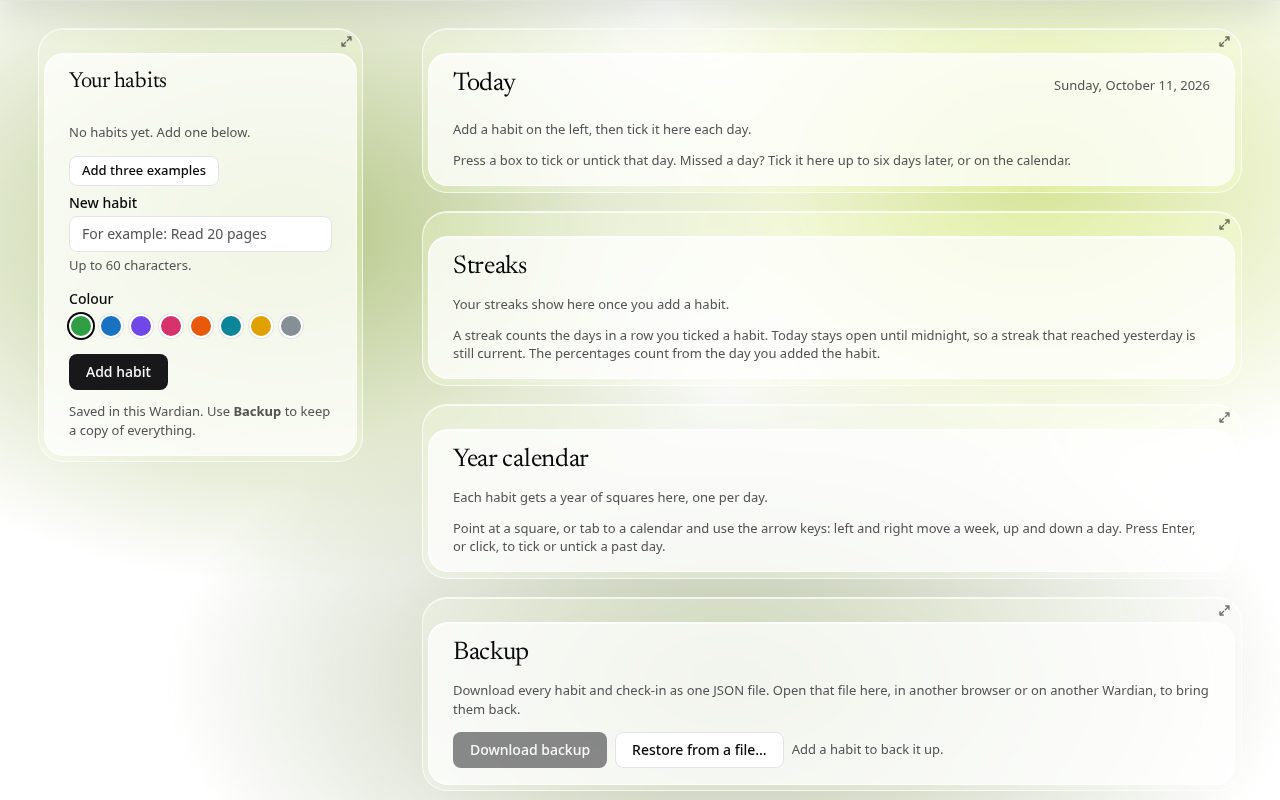
- Today: each habit with a box for today and the six days before it, and how many are done today.
- Streaks: the current and longest run of days in a row, and how often each habit was kept in the last 30 and 90 days.
- Year calendar: a square per day for the last 53 weeks, per habit and for all habits together.
- Backup: how many habits and check-ins there are, to download or restore.
How it behaves
- With no habits yet, the list says how to start and offers Add three examples; Today says to add a habit first.
- A name is checked when you leave the field and when you press Add habit: an empty or repeated name is outlined and the hint under it says what is allowed. Nothing typed is cleared. Renaming works the same way; Escape cancels.
- Deleting a habit asks first, saying how many check-ins go with it.
- Download backup is disabled only with its reason beside it (no habits yet, or downloads not available), and says "Saving…" while it saves. A restore checks the whole file first, says what it holds and what it replaces, and changes nothing until you press Replace my data.
- The day moves on at midnight, and when the page comes back into view.
Layout
Two columns: the habits on the left; Today, Streaks, the calendar and Backup on the right. One column on a phone. Tab order is the reading order.
| Panel | Holds |
|---|---|
| Your habits (aside) | The list (each with ↑, ↓, Edit, Delete); New habit (text, size-lg, hint "Up to 60 characters"); Colour (radio group, arrow keys move); Add habit. |
| Today | The week's boxes, one row per habit; arrow keys move between boxes, Space or Enter ticks. |
| Streaks | A table of current, longest, 30-day and 90-day figures. |
| Year calendar | The squares; arrows move, Enter ticks. |
| Backup | Download backup and Restore from a file…, with the reason when Download is disabled. |
How it is built
A Wardian suite of six sealed apps, plain JavaScript. It shows storage (saved state kept by Wardian) and retained topics.
| App | Slot | Job | Contract |
|---|---|---|---|
log | — | Owns the check-ins and the clock. Ticks and unticks days, forgets a deleted habit's days, restores a backup. Moves every view to the new day at midnight. | provides set, forget, restore; emits log:changed (retained); storage |
habits | aside | Add, rename, recolour, reorder and delete habits. Owns the list. | emits habits:changed (retained); listens log:changed; needs log.forget; provides restore; storage |
today | main | Tick today and the six days before it, one press each. Arrow keys move between boxes. | listens habits:changed, log:changed; needs log.set |
streaks | main | Current streak, longest streak, and how often you kept each habit in the last 30 and 90 days. | listens habits:changed, log:changed |
calendar | main | A year of squares per habit, and one for all habits together. Keyboard: arrows move, Enter ticks. | listens habits:changed, log:changed; needs log.set |
backup | main | Downloads everything as JSON. Reads such a file back, checks it in full, and asks before it replaces anything. | listens habits:changed, log:changed; needs habits.restore, log.restore; claude:downloads |
How a change flows: you press a box in today → it calls log.set → log saves the check-in and emits log:changed → today, streaks, calendar, backup and habits each redraw. A new habit goes the same way through habits and habits:changed.
Each piece of data has one owner. habits alone writes the list of habits; log alone writes the check-ins. Other parts ask the owner through a method. So two panels can never save different versions of the same thing.
Both topics are retained. A part that starts late, or after a reload, gets the latest list and check-ins at once. On a reload the owners read ctx.store and emit again.
Days are local calendar days, kept as text such as 2026-10-08. Day arithmetic uses the day's numbers, not clock time, so summer time never skips or repeats a day. log checks the date at midnight, every minute, and when the page comes back into view.
shared/days.js (days), shared/model.js (the data's shape and its checks) and shared/stats.js (streaks) are listed in suite.json "scripts", so every frame gets its own copy.
The backup file
{ "format": "wardian-habit-tracker", "version": 1, "exported": "2026-10-08T21:04:00.000Z",
  "habits": [{ "id": "hm1x2y3", "name": "Read 20 pages", "color": "#1971c2", "created": "2026-10-01" }],
  "days": { "hm1x2y3": ["2026-10-07", "2026-10-08"] } }
A restore refuses a file that is not JSON, is not this format, has a habit with no name or a repeated id, or has a day that does not exist, such as 2026-02-30. Nothing changes until you press Replace my data.
Limits
- Up to 100 habits, each name up to 60 characters. A backup file may be up to 5 MB.
- A habit is done or not done on a day. There are no counts, such as "8 glasses of water".
- You cannot tick a day that has not come yet.
- The data lives where
storagekeeps it: in this Wardian's data folder (state/). Another Wardian does not see it. Use the backup to move it. - The calendar shows the last 53 weeks. Older check-ins stay in the data and in the streaks.
What's new
Version 2 Oct 12, 2026
Rebuilt to the new standard: clearer fields with units and limits, help and errors right under each field, sample data labelled, and the app opens straight on its content.
Version 1 Oct 11, 2026
First published.
Ratings and reviews
No ratings yet.