 wardian
Unit converter
Everyday conversions: temperature, length, mass, US volume, speed, fuel use, pressure, power, food energy and BMI. Each name says what goes in and what comes out: km_to_miles takes kilometres. Two-input functions name both, in order: bmi_kg_m takes weight in kg, then height in m. Results are rounded to 4 decimal places; an input out of range, such as a height of 0, gives NaN.
It is free. You get a .wardian file to open in Wardian.
About
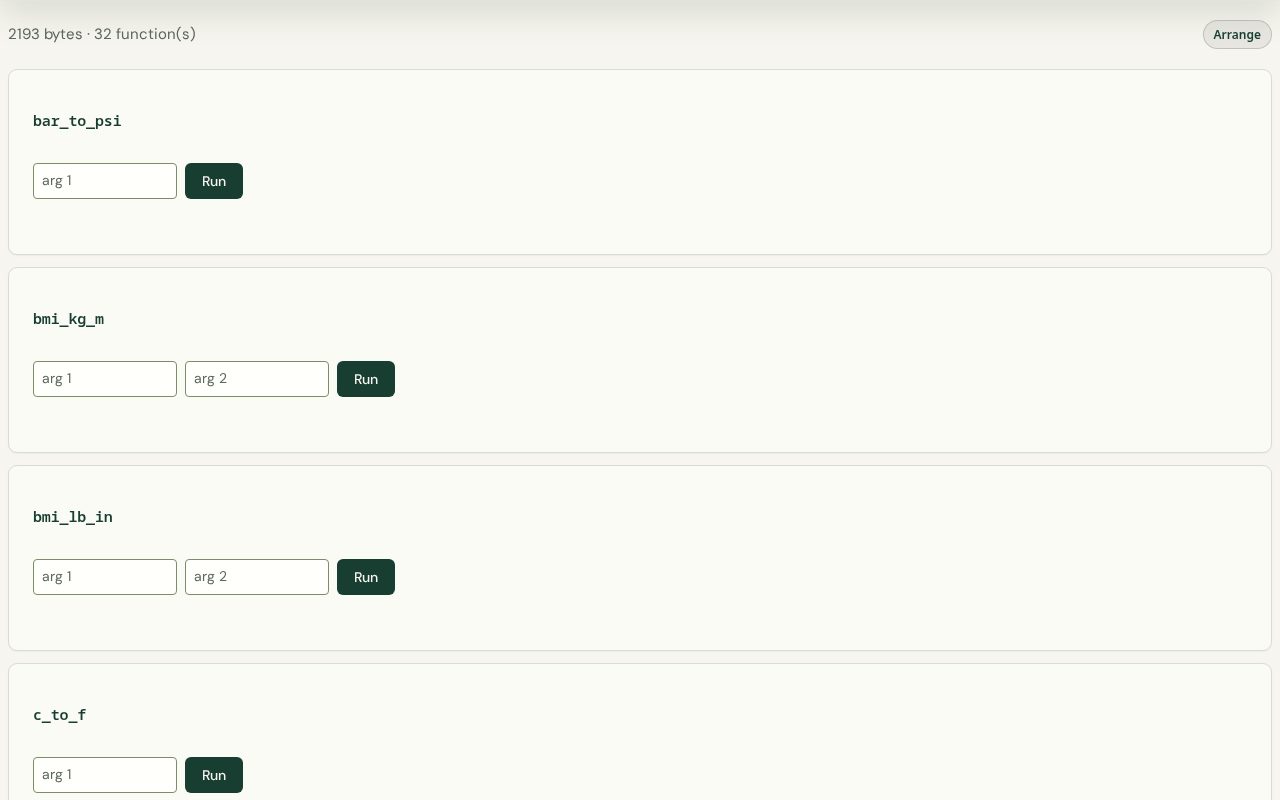
For anyone converting an everyday measurement: temperature, length, mass, US volume, speed, fuel use, pressure, power, food energy, or body mass index. A Wardian module app: 32 conversions, each a WebAssembly function of numbers. There is no page; Wardian reads the module's exports and draws a card for each function, with an input per parameter and a Run button.
Why a module: every conversion takes numbers and returns a number. That is exactly what a module app shows without help, so the whole interface comes from src/lib.rs. No HTML, no JavaScript.
What you put in
Each function's name says what goes in and what comes out: km_to_miles takes kilometres. Wardian labels the inputs "arg 1", "arg 2", so a function with two inputs names both, in order: bmi_kg_m takes the weight in kilograms first, then the height in metres. Every input is a decimal number; an empty input counts as 0.
| Group | Function | Input | Unit | Allowed |
|---|---|---|---|---|
| Temperature | c_to_f, f_to_c | a temperature | °C, °F | any |
c_to_k | a temperature | °C | −273.15 or more | |
k_to_c | a temperature | K | 0 or more | |
| Length | km_to_miles, miles_to_km, m_to_feet, feet_to_m, cm_to_inches, inches_to_cm | a length | as named | any |
feet_inches_to_cm | feet, then inches | ft, in | any | |
| Mass | kg_to_lb, lb_to_kg, g_to_oz, oz_to_g | a mass | as named | any |
| Volume (US) | liters_to_gallons, gallons_to_liters, ml_to_floz, floz_to_ml | a volume | as named | any |
| Speed | kmh_to_mph, mph_to_kmh | a speed | as named | any |
| Fuel use | mpg_to_l_per_100km, l_per_100km_to_mpg | fuel use | US mpg, L/100 km | above 0 |
| Pressure | kpa_to_psi, psi_to_kpa, bar_to_psi | a pressure | as named | any |
| Power and energy | kw_to_hp, hp_to_kw, kcal_to_kj, kj_to_kcal | power or energy | as named | any |
| Body | bmi_kg_m | weight, then height | kg, m | weight 0 or more, height above 0 |
bmi_lb_in | weight, then height | lb, in | weight 0 or more, height above 0 |
What it shows
One number under the card: the converted value, rounded to 4 decimal places (BMI to 1), so 37 °C shows as 98.6 and not 98.60000000000001.
How it behaves
- Out of range: an input outside what is allowed (a height of 0, fuel use of 0, a temperature below absolute zero) gives
NaN, "not a number", never a made-up answer such as 0. - Not a number: text in an input is refused by Wardian before the function runs ("every argument must be a number").
- Gallons and fluid ounces are US units. The factors are the exact legal definitions (1 mile = 1.609344 km, 1 lb = 0.45359237 kg, 1 US gallon = 3.785411784 L). Horsepower is mechanical horsepower (745.7 W), not metric.
- Nothing leaves the browser, and nothing is kept.
Layout
Wardian draws it: one card per function, in alphabetical order of the names, each with its inputs, a Run button (Enter runs it too) and the result. Arrange lets each viewer reorder and hide the cards. Because the host draws the controls, the page rules for field sizes and markup do not apply here; the names, the order and the out-of-range answers are this app's part.
Files
| File | What it is |
|---|---|
src/lib.rs | The conversions. Each #[no_mangle] pub extern "C" fn becomes a card in Wardian. Unit tests at the end, including the out-of-range answers. |
app.wasm | The module Wardian runs, about 2 KB. Built from src/lib.rs. |
app.json | The title and the description in the app list. |
build.sh | Rebuilds app.wasm. |
Change it: edit src/lib.rs, run cargo test, run ./build.sh, then wardian check ..
What's new
Version 2 Oct 12, 2026
Rebuilt to the new standard: clearer fields with units and limits, help and errors right under each field, sample data labelled, and the app opens straight on its content.
Version 1 Oct 11, 2026
First published.
Ratings and reviews
No ratings yet.