 wardian
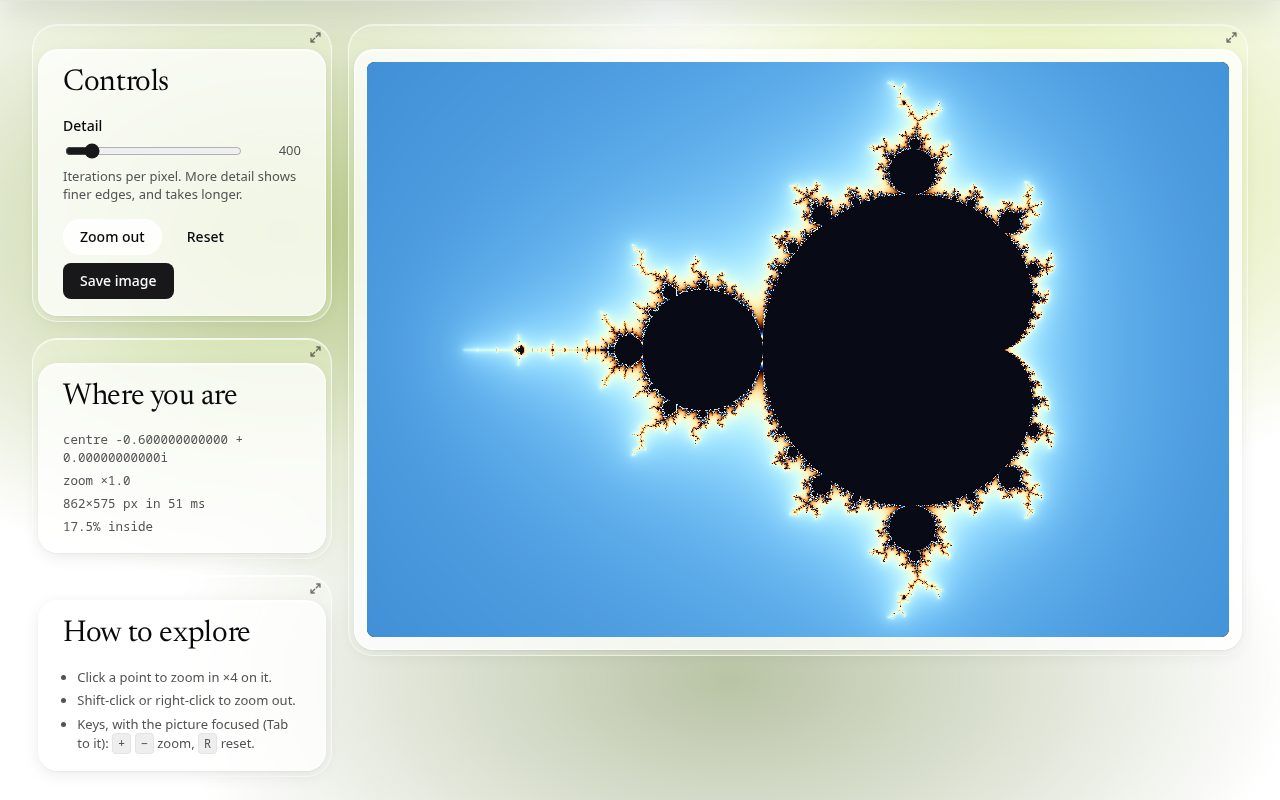
Mandelbrot explorer
WebAssembly renders the Mandelbrot set into pixels; click anywhere to zoom in.
It is free. You get a .wardian file to open in Wardian.
Try it
Runs here as it does in Wardian, without its saved data, channels or other apps.
About
For anyone who wants to wander into the Mandelbrot set: click to dive in, keep zooming into its endless edges, and save the views you like as pictures. WebAssembly draws every pixel, so even deep, detailed views appear in a moment.
What you put in
- Where to look: click a point on the picture to zoom in ×4 on it; shift-click or right-click to zoom out. With the picture focused,
+zooms in on its centre,−zooms out,Rresets. - Detail: a slider, iterations per pixel, 50 to 3,000 in steps of 50, default 400. Always valid.
There is no typed input, so every value is valid by construction. Zooming out stops at four times the whole set.
What it shows
- The picture: the set at the current centre and zoom, coloured by how fast each point escapes.
- Where you are: the centre as a complex number, the zoom, the picture's size in pixels and how long it took to draw, and the share of points inside the set. Past ×10¹³ it says the view is at the limit of 64-bit precision.
How it behaves
- It opens on the whole set at 400 iterations.
- Every zoom, reset or detail change redraws at once; deep views at high detail take longer, and the time shows under Where you are.
- Save image downloads the picture as
mandelbrot.png, at the picture's own resolution. - Nothing is kept between visits.
Layout
- Side column, in reading and tab order:
- Controls: Detail (slider, with the value beside it and a hint), then Zoom out, Reset, and Save image (the main action).
- Where you are: the read-out, announced politely when it changes.
- How to explore: clicks and keys.
- Main column: the picture, focusable so the keys work from the keyboard.
- Every part is an Arrange panel. At 760px and below the columns stack, the picture last.
How it is built
| File | What it is |
|---|---|
index.html | The page: controls, read-out, help and the picture. |
app.js | Sizes the canvas, asks the module to render, puts the pixels on screen, handles zoom. |
src/lib.rs | render(out, width, height, cx, cy, scale, max_iter) plus alloc / dealloc. |
app.wasm | Built from src/lib.rs by ./build.sh. |
ui/ | The Wardian component library: theme, button, field, card, type, surface and Arrange. |
- A 1600 × 1066 view at 400 iterations is hundreds of millions of steps; one call into the module fills the whole buffer, and no per-pixel calls cross into JavaScript.
- The page reserves
width × height × 4bytes withalloc, passes the address torender, then wraps the same bytes in anImageData. The buffer is reused until the canvas size changes. - Coordinates are 64-bit floats, so detail runs out near ×10¹³ zoom.
What's new
Version 2 Oct 12, 2026
Rebuilt to the new standard: clearer fields with units and limits, help and errors right under each field, sample data labelled, and the app opens straight on its content.
Version 1 Oct 11, 2026
First published.
Ratings and reviews
No ratings yet.