 wardian
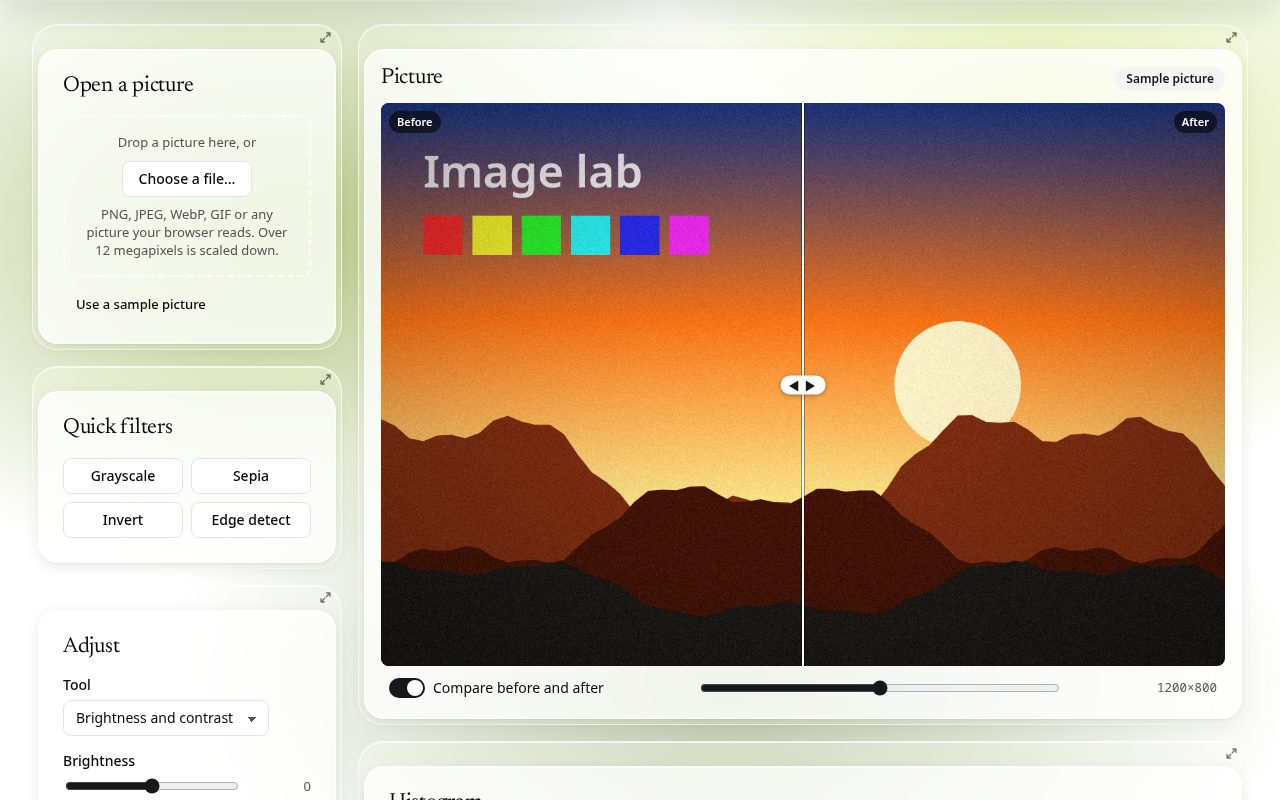
Image lab
Photo filters in WebAssembly: blur, sharpen, edges, tone and a live RGB histogram. Your picture never leaves this computer.
It is free. You get a .wardian file to open in Wardian.
Try it
Runs here as it does in Wardian, without its saved data, channels or other apps.
About
For anyone who wants to touch up or play with a picture without uploading it anywhere: open a photo, try filters (blur, sharpen, edges, tone, posterize, threshold) with a before-and-after divider and a live RGB histogram, keep the changes you like, undo the rest, and save a PNG. WebAssembly does every pixel loop; the picture never leaves this computer.
What you put in
| Input | Type | Unit | Allowed | Default | Required |
|---|---|---|---|---|---|
| Picture | a file | an image the browser can read (PNG, JPEG, WebP, GIF, BMP, AVIF…); over 12 megapixels is scaled down | a sample picture, labelled | required to edit (the sample is open at first) | |
| Tool | one of Brightness and contrast, Gaussian blur, Box blur, Sharpen, Posterize, Threshold | Brightness and contrast | required | ||
| Brightness | whole number | −100 to 100 | 0 | ||
| Contrast | whole number | −100 to 100 | 0 | ||
| Spread | decimal, steps of 0.5 | pixels | 0.5 to 40 | 3 | |
| Radius | whole number | pixels | 1 to 60 | 4 | |
| Amount | decimal, steps of 0.1 | times | 0.1 to 4 | 1 | |
| Edge width | decimal, steps of 0.5 | pixels | 0.5 to 8 | 1.5 | |
| Levels per channel | whole number | levels | 2 to 16 | 4 | |
| Cut-off | whole number | level | 0 to 255 | 128 | |
| Compare before and after | on or off | on | |||
| Divider position | whole number | % of the width | 0 to 100 | 50 |
The sliders allow only their range and step, so a value cannot be out of range.
What it shows
- Picture: the edited picture, with the original on the left of a divider you drag (or set with the slider below it), its size in pixels and how long the last filter took.
- Histogram: how many pixels have each level of red, green and blue, and the share that is pure black or white when it is over 2%.
- History: each change kept, in order.
How it behaves
- First screen: a sample picture (a sunset drawn by the page), marked Sample picture.
- Preview, then keep: moving a slider previews the tool on the picture, marked "Preview: not applied yet"; Apply keeps it, Discard drops it. The quick filters apply at once.
- Undo and reset: Undo (or Ctrl+Z / ⌘Z) steps back one change, or drops a preview; Reset goes back to the original as one more step, so it can be undone too. History says "No changes yet." until there is one, which is also why Undo is off then.
- Errors: a file that is not a picture, or one the browser cannot read, is refused with what is allowed, under the drop area and in a toast; the open picture stays.
- Large pictures are scaled to 12 megapixels so filters stay quick, and the page says so.
- Success: saving downloads
<name>-edited.png. - Kept between visits: nothing; the page is sealed.
Layout
Two columns that Arrange may swap or join; one column under 760px. Reading order and tab order:
- Open a picture (side): the drop area with Choose a file… (
input type="file"withaccept="image/*") and its hint, where file errors show; Use a sample picture. - Quick filters (side): Grayscale, Sepia, Invert, Edge detect.
- Adjust (side): Tool (
select,size-md), the tool's sliders, each with its value and unit beside it, the note, then Apply (solid, the main action) and Discard. - History (side): the list, Undo, Reset, Save image.
- Picture (main): the source badge, the picture, then Compare before and after and the divider slider.
- Histogram (main): the chart and its legend (red, green, blue, named in text as well).
Files
| File | What it is |
|---|---|
index.html | The page: six panels. |
app.js | The parsers (the file, each slider), opening, preview and undo, the histogram, the divider. |
src/lib.rs | The filters, each working in place on one RGBA buffer in WebAssembly memory, and the histogram. Unit tests at the end. |
app.wasm | Built from src/lib.rs by ./build.sh. |
ui/ | The Wardian component library. |
How data moves: the page draws the picture on a canvas, copies its RGBA bytes once into a buffer in the module's memory, calls a filter on it in place, and draws the same bytes back. JavaScript keeps the original, the current picture and the undo steps (at most 200 MB of them).
Change it: edit src/lib.rs and app.js, run cargo test, run ./build.sh, then wardian check ..
What's new
Version 2 Oct 12, 2026
Rebuilt to the new standard: clearer fields with units and limits, help and errors right under each field, sample data labelled, and the app opens straight on its content.
Version 1 Oct 11, 2026
First published.
Ratings and reviews
No ratings yet.